Give one product the spotlight.
Build a product Showcase in WordPress that complements your reviews with a focused layout, useful details and a straightforward next step for readers.
Make the featured product easy to understand.
A Showcase lets readers focus on one product and the reasons it might fit their needs.
Create a new Showcase
Go to AzlinkPRO Showcase in your WordPress dashboard and add a new saved Showcase item.
Choose and verify the product
Enter an Amazon ASIN if using Amazon-supported lookup and check the details against approved sources. Confirm the right marketplace.
Select the display layout
Choose the available split or centered presentation. Add an appropriate image you have permission to show.
Write reader-focused features
Summarize meaningful product attributes and keep descriptions accurate. Do not invent tests, ratings or availability.
Publish the item
Save your Showcase and copy its generated shortcode. Paste it into a WordPress Shortcode block, then preview the finished page.
Shortcode example
Use a saved entry ID from your own plugin editor. These examples are displayed as text, not executed.
[azlinkpro_showcase id="123"]Replace 123 with your saved Showcase ID, not the product ASIN.
See an actual Showcase rendering.
The sample below displays an existing Duxtop 9600LS induction cooktop Showcase saved on AzlinkPRO.
Duxtop 9600LS Portable Induction Cooktop
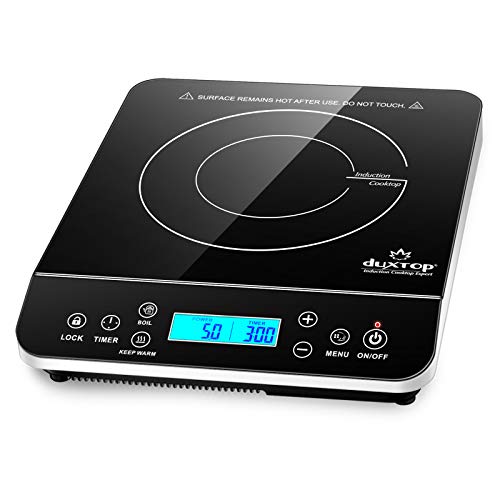
- Portable 1,800-watt cooktop with 20 power settings, 20 temperature settings and an LCD touch control panel
As an Amazon Associate, we may earn a small commission from qualifying purchases.
What makes a Showcase useful?
Well-presented information is only as good as the research behind it. Give readers reliable details and helpful context.
- A descriptive name readers can recognize
- A clean, relevant product image
- A short list of meaningful attributes and use cases
- An action that clearly indicates its affiliate destination
- Supporting review text explaining why this item was chosen
A few more things to know.
Does Showcase need an Amazon ASIN?
The current Amazon-focused Showcase workflow uses product ASINs. Confirm current module requirements in its editor and provide licensed images and valid content.
What if the product image is missing?
Review your Amazon Creators API credentials and image permissions or use an alternative image you are authorized to display.
Should I put a Showcase above my comparison table?
That depends on your article, but visitors often benefit from seeing a concise comparison before individual product highlights.
Affiliate disclosure example: As an Amazon Associate, we may earn a small commission from qualifying purchases.